¶ User Roles and Permissions
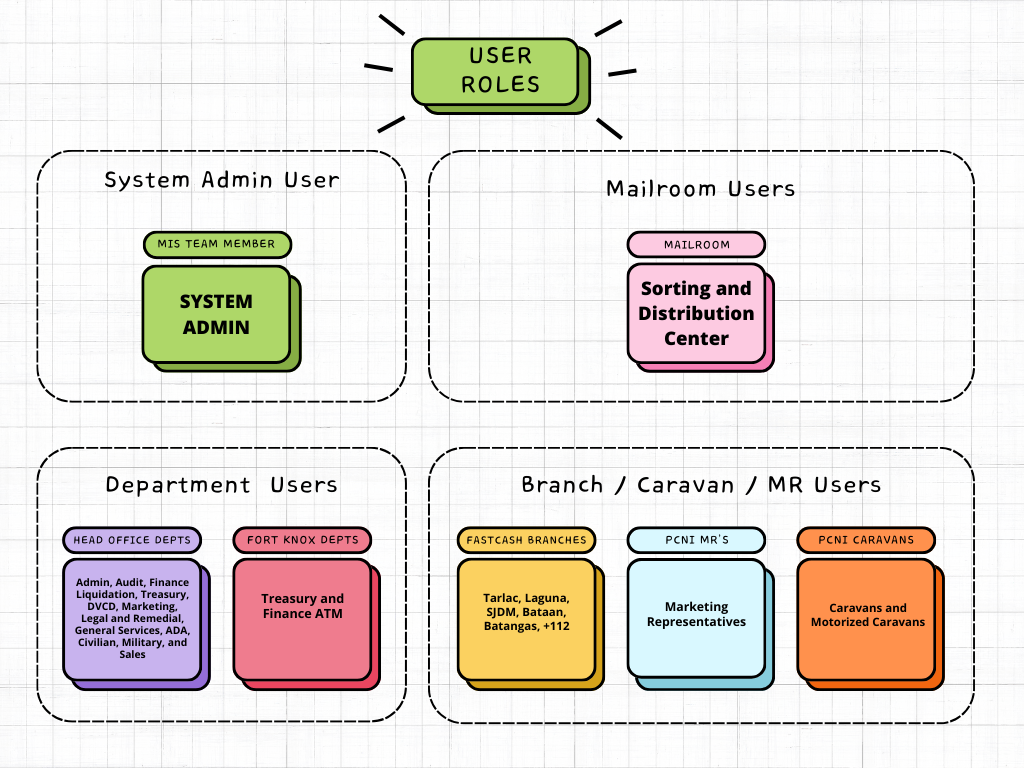
¶ Branch Users
Branch users are responsible for initiating pouch dispatches, tagging issues to problematic pouches and monitoring the status of dispatched pouches. Their permissions include:
- View Dashboard
- View Inbound and Outbound of Branch
- View and Create Pouches for Sending to Mailroom
- Tag and Resolve Issues of Pouches
- Receipt of Pouches from Mailroom
- View and Export Audit Trail
¶ Department Users
Department users are responsible for receiving and sending items to the mailroom. Their permissions include:
- View Dashboard
- View Inbound and Outbound of Department
- View and Create Items for Sending to Mailroom
- Receipt of Items from Mailroom
- View and Export Audit Trail
¶ Mailroom Users
Mailroom users play a crucial role in receiving, sorting, and sending pouches within the system. Their permissions include:
- View Dashboard
- View Inbound and Outbound of Mailroom
- View and Create Items for Pouch Creation
- Tag and Resolve Issues of Pouches from Branches
- Receipt of Pouches from Branches
- Sorting and Creating Pouches for Sending to Branches
- Receipt of Items from Departments
- Sorting and Sending of Items to Departments
- View, Create, Edit, and Delete Couriers
- View, Create, Edit, and Delete Parcel Sizes
- View and Export Audit Trail
¶ System Administrator
The system administrator has overall control and configuration capabilities within the Pouch Receiving System. Their permissions include:
- View Dashboard
- View, Create, Edit, and Delete Users
- View, Create, Edit, and Delete User Types
- View, Create, Edit, and Delete Departments
- View, Create, Edit, and Delete Branches
- View, Create, Edit, and Delete Couriers
- View, Create, Edit, and Delete Parcel Sizes
- View, Create, Edit, and Delete Dropdown Options
- View and Export Audit Trail